Capture Application
The capture application drives the Domesday Duplicator board. It finds the device, streams 40 million samples a second off it, proves that nothing was lost on the way, shows you what the signal is doing while it happens, and writes it to disk in a format the decode toolchains open directly. It also installs the software that runs inside the Duplicator itself.
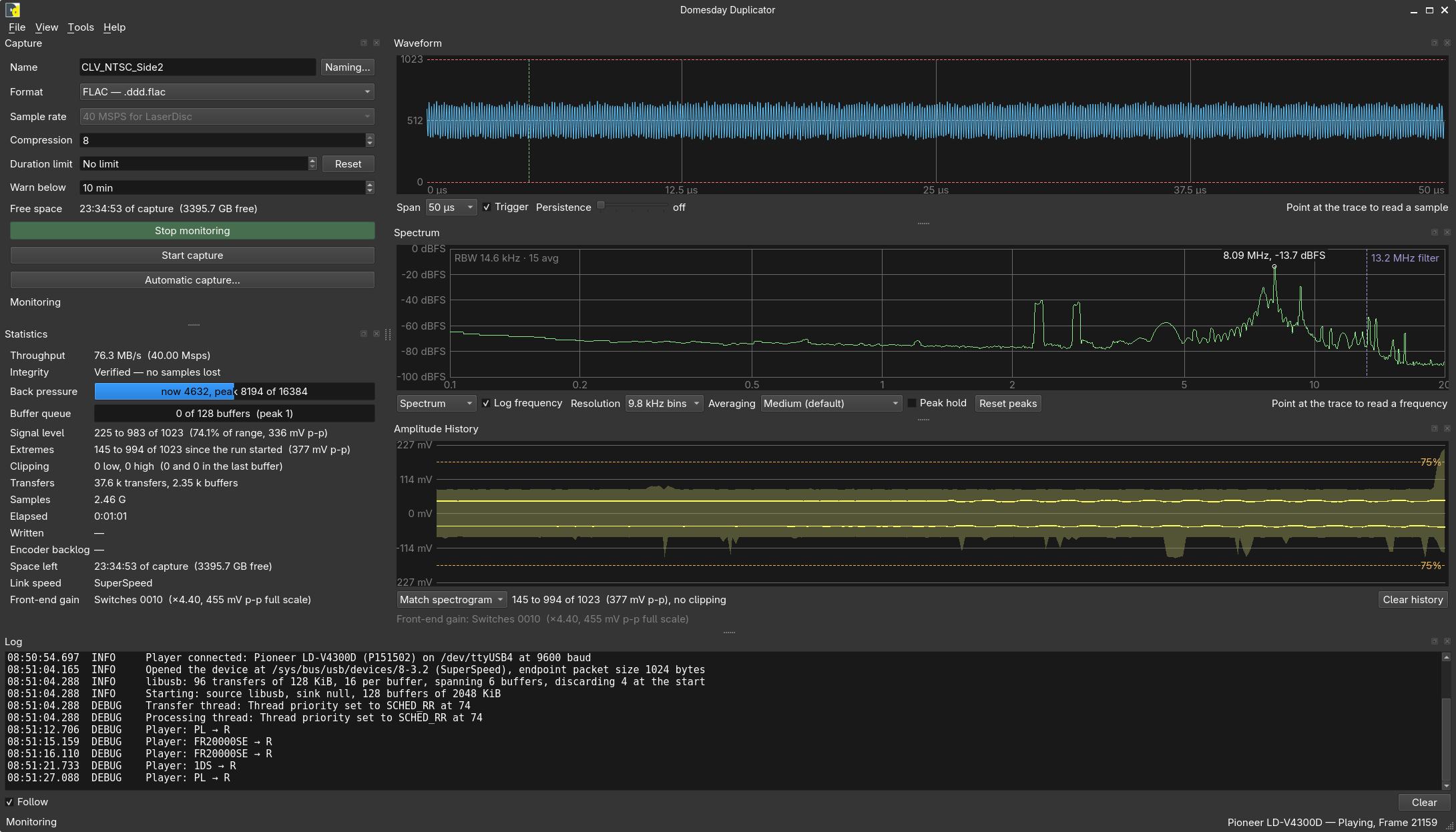
If you have just plugged a Duplicator in for the first time, go to the Quick start.
Which package do I want?
| Platform | Package | Notes |
|---|---|---|
| Linux | Flatpak | Also needs udev rules installed on the host — a Flatpak cannot do that for you |
| macOS | DMG | Apple Silicon only; unsigned, so the first launch needs a Gatekeeper step |
| Windows | MSI | Windows 11 only; the device also needs the WinUSB driver bound with Zadig |
Every release also carries a SHA256SUMS file so a download can be verified, and a
PROVENANCE.txt recording the commit and the toolchains it was built with.
Building it yourself — for development, or for a platform the packages do not cover — is described in Building locally.
The parts of it
The application is a set of panels around one stream. You can float them, close them and rearrange them; The main window covers that, and the pages below cover what each one is for.
| What it does | |
|---|---|
| Capture control | What the capture is called, what it is written as, and the buttons that start things |
| Statistics | Throughput, integrity, buffer depth and clipping, second by second |
| Signal analysis | The three questions a good capture answers — do I have a signal, what is the signal, can I capture it — and the scope, spectrum and level history that answer them |
| Capture files | What gets written, what it is called, and what reads it |
| Naming and metadata | Saying what the disc is, and the metadata file written beside every capture |
| Settings | Where captures are written, which device to use, buffer queue, USB transfer mode and the front-end gain declaration |
| Player control | Driving a LaserDisc player over its serial port: examining a disc, and the automatic capture that takes a side by itself |
| Test mode | Proving the capture path with the gateware's test pattern |
| Updating your Duplicator | Installing firmware and gateware into the device |
| Command line | The options the application accepts, and the scriptable analysis |
| Scripting captures | Starting and stopping a capture from a script, with no window if you want none — and starting an audio recording at the same moment |
Getting the device programmed, and what to do when something is wrong
The application also installs the software that runs inside the Duplicator, and names every failure it can see rather than leaving you to guess.
| When you want it | |
|---|---|
| Updating your Duplicator | The routine case: a newer firmware or gateware release onto a board that already works. One file, one button, no case opened |
| Bringing up a new or legacy board | A newly built board, or one running firmware from before this application existed. Needs the case off and a second cable |
| If an update fails | An update that stopped part way. The device is not damaged, and the repair is a single button |
| If a capture fails | A capture that stopped for a reason, and the cases where nothing failed but nothing works either |
Monitoring and capturing are different things
This is the one idea worth knowing before anything else.
Monitoring opens the device and runs the stream with nothing on the end of it. The signal is validated and measured, every display is live, and nothing is written anywhere. It is what you use to set a player's RF output, to check a cable, or to see whether a disc is worth capturing — which is to say it is where the three questions get answered, before there is a file at stake.
Capturing is the same stream with a file attached to it. Starting a capture from idle starts the stream too, so the common case is a single press; stopping a capture leaves the stream running, so the next side of a disc is one press away and the device is never reopened between them.
Two ways to take a capture
Both write the same file with the same metadata beside it. Which one to use is about who is driving the player, not about what you get.
By hand. Press Start capture, press Stop capture. Nothing is sent to a player that you did not ask for, so it is the path for setting up, for checking a disc, and for anything that is not a whole side of a LaserDisc. Naming is optional; the Naming… dialog is there when you want it, and can fill three of its fields from the disc itself.
Automatically, when a player is connected. Tools ▸ Player ▸ Automatic capture… walks four pages — what is in the player, what to take off it and where to put it, the run, and what happened — examining the disc, naming the capture from what it found, driving the player through the side, and stopping both at the end. Capture another side on the last page turns the whole thing round for the other side of the disc. It is the path for working through a stack of them.
Either can be started from a script instead of by hand, with the window or without one — which is what to do when something else has to start recording at the same moment, or when nobody is going to be in the room. See Scripting captures.
What it writes
Captures are written as native FLAC, with the compound extension .ddd.flac — a plain
.flac to anything that reads audio, with the .ddd in front of it saying where the
samples came from. ld-decode and vhs-decode take one directly, at roughly half the size of
the raw sample data.
Each file carries its own provenance in its tags: the builds that made it — the application, the Duplicator's firmware and its gateware — the real 40 MHz sample rate that a FLAC header cannot express, whether it was taken in test mode, and the front-end gain if one was declared. See Capture files.
Releases
The capture application is released on its own schedule, under gui-v* tags. The
firmware and gateware release separately under fw-v* tags — a fix to the application does
not mean you need to reflash anything, and a firmware release does not mean you need a new
application.