FX3 firmware
How to build the Domesday Duplicator's USB 3.0 firmware and get it onto the device, with a check to confirm each step actually worked.
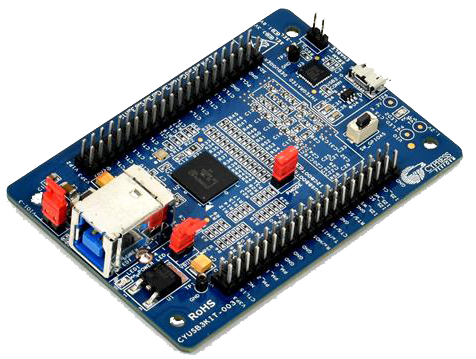
The FX3 is a Cypress EZ-USB FX3 SuperSpeed Explorer Kit (CYUSB3KIT-003) that plugs into the Domesday Duplicator PCB. Everything on this page happens over the FX3's own USB connector.
There are two ways to program it, and you will usually want both:
| Writes to | Survives a power cycle | Use for | |
|---|---|---|---|
RAM (-u) |
Volatile memory | No | Testing a build before committing to it |
I2C EEPROM (-p) |
The kit's onboard EEPROM | Yes | Normal use |
Start with RAM. It cannot leave the device in a bad state — a power cycle undoes it completely — so it is the safe way to find out whether an image works before making it permanent.
There is no SPI flash here
The SuperSpeed Explorer Kit boots from an I2C EEPROM. Older versions of
fx3-programmer's help text described -p as programming "SPI flash"; that was wrong,
and there has never been an SPI code path. If you are reading documentation that mentions
SPI flash for this board, it is out of date.
The application can do this for you
Everything on this page is now also available from ddd-gui — Tools ▸ Firmware ▸
Bring up a new or legacy board… — which programs both the FX3 and the FPGA
with no vendor toolchain installed at all. See Bringing up a new or legacy
board.
This page remains the reference for what the wizard is doing, and the route to take when something needs doing by hand.
Before you start
- Set up device access — Linux device access. Without it every command below reports that no device was found.
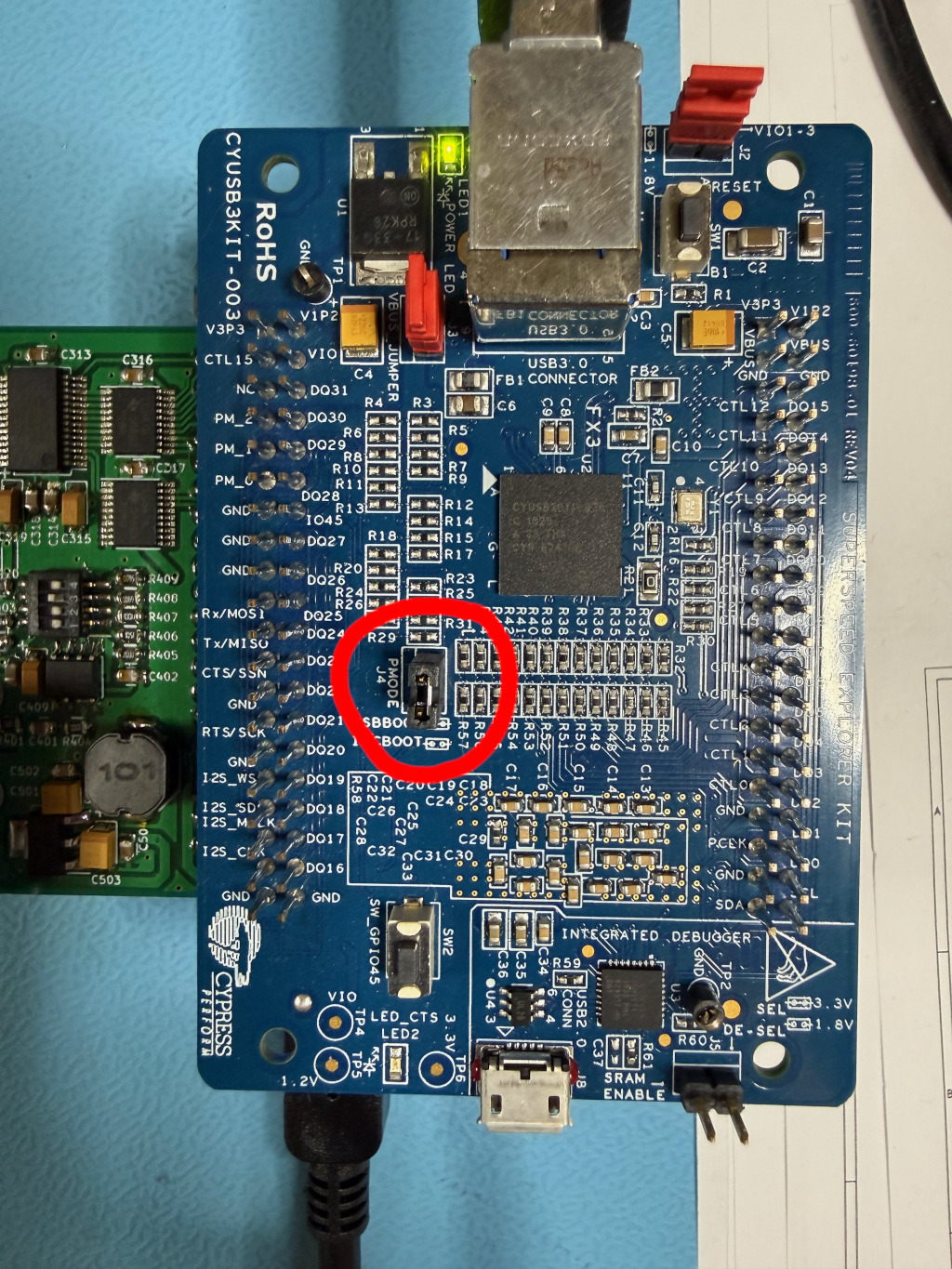
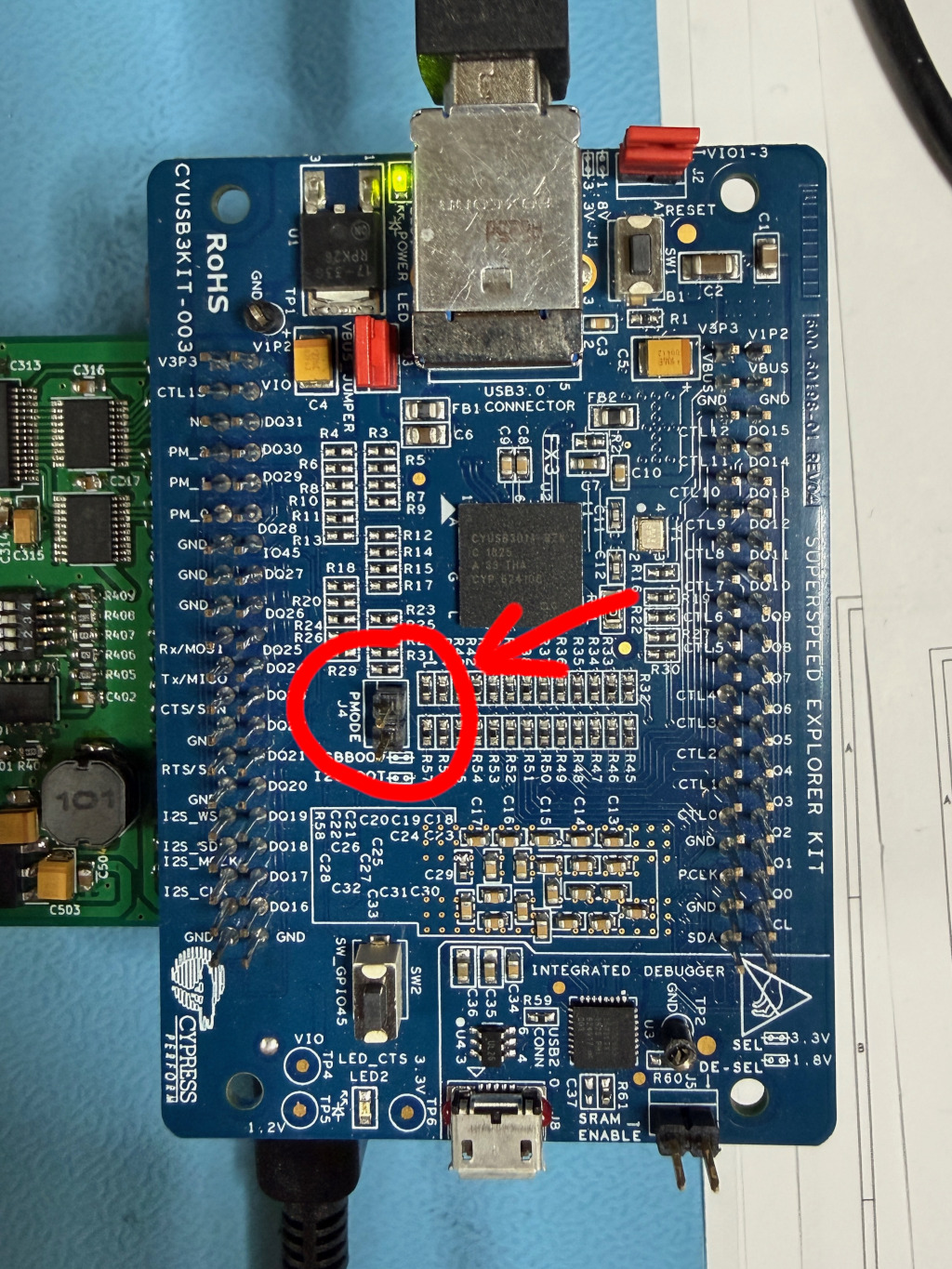
- Locate the PMODE jumper, J4, on the FX3 board. You will be moving it.
The two positions, which every step below refers to as fitted and removed:
1. Build the firmware
From anywhere in a checkout:
firmware.img is the one you program. Nothing needs installing first — the ARM cross
compiler, the image builder and the SDK all come from the flake.
For an editing loop rather than a one-shot build, nix develop .#fx3 gives the same
toolchain as a shell; the build options are in
fx3/firmware/README.md.
Check: does the build know what it is?
The firmware stamps the commit it was built from into its USB product descriptor, which is how you will confirm later that the device is running your image and not the one that was already on it. The configure step prints it:
A value of unknown means the build could not determine a version — pass one explicitly with
-DFIRMWARE_VERSION=<hash>. A -dirty suffix means the working tree had uncommitted
changes, so the hash alone does not describe what you built. Both are worth noticing before
you program anything.
2. Put the FX3 into bootloader mode
Both programming modes need the FX3's boot ROM in control. Once the device is running
firmware, the boot ROM is not, and neither -u nor -p will work.
- Fit the PMODE jumper (J4).
- Power cycle the board — unplug the FX3's USB cable and plug it back in.
Check: is it in bootloader mode?
$ lsusb -d 04b4:
Bus 007 Device 013: ID 04b4:00f3 Cypress Semiconductor Corp. FX3 micro-controller (DFU mode)
04b4:00f3 and "DFU mode" is what you want. And through the tool:
$ fx3-programmer -l
Found 1 FX3 device(s):

[0] VID:PID=04b4:00f3 Bus=007 Device=013 Mode=Bootloader (FX3)
If it still shows 1209:2347 / Mode=Application, the jumper is not fitted or the board was
not actually power cycled. Note that a warm reboot of your PC may not cut USB bus power —
unplug the cable.
3a. Load into RAM — the test path
Uploading result/firmware.img (111348 bytes) to FX3 device 0...
Target device: VID:PID=04b4:00f3
........................................................
Program entry address: 0x400074e8

Successfully uploaded 111300 bytes to FX3 device 0
The bootloader transfers control to the image as soon as the download finishes — there is no separate start step. The device disappears from the bus and comes back as the Domesday Duplicator a second or so later.
This is volatile. Power cycle and it is gone. That is the point: if the image is broken, you have lost nothing.
3b. Write the EEPROM — the production path
Do this once you are satisfied the image works.
Downloading flash programmer /…/share/domesday-duplicator/cyfxflashprog.img to device 0...
Successfully uploaded 106408 bytes to FX3 device 0
Found FX3 flash programmer (device 0)
Programming result/firmware.img (111348 bytes, padded to 111360) to FX3 I2C EEPROM...
..
Successfully programmed 111360 bytes to FX3 I2C EEPROM
Verifying result/firmware.img against FX3 I2C EEPROM (111348 bytes, padded to 111360)...
..
Verification successful: EEPROM matches result/firmware.img
Power cycle the device (remove J4/PMODE to boot from EEPROM)
Three things worth understanding in that output:
- A Cypress secondary loader is downloaded first. The FX3 boot ROM can only write RAM, so
reaching the EEPROM needs a helper program running on the device.
fx3-programmerships it and finds it automatically. - The device re-enumerates as
04b4:4720partway through. That is the loader running. It is expected and goes away at the next power cycle. -vis worth using. It re-reads the EEPROM and compares it against the file. Each chunk is also verified as it is written, but-vchecks the whole image afterwards.
Then:
- Remove the PMODE jumper (J4).
- Power cycle the board.
It should now boot the programmed firmware on its own, with no host involvement.
Confirming what is running
This is the step people skip, and it is the only one that proves anything.
Then read the descriptors:
$ lsusb -v -d 1209:2347 | grep -iE "bcdUSB|iManufacturer|iProduct"
  bcdUSB               3.00
  iManufacturer           1 Domesday86
  iProduct                2 Domesday Duplicator (d0566b3e)
Three things to check, in order of importance:
| Field | Expect | If it is wrong |
|---|---|---|
iProduct |
Domesday Duplicator (<commit>) |
The hash in brackets is the commit the firmware was built from. If it is not the one your build printed, the device is running something else — most likely the previous EEPROM contents, meaning your programming did not take |
bcdUSB |
3.00 |
At 2.10 or lower the device fell back to USB 2.0. Try a different cable or port — this halves your capture bandwidth and causes dropped samples |
iManufacturer |
Domesday86 |
Anything else is not this firmware |
You can also confirm the negotiated link speed:
$ for d in /sys/bus/usb/devices/*/; do
    [ "$(cat $d/idVendor 2>/dev/null)" = "1209" ] && \
    echo "$(cat $d/speed) Mbps — $(cat $d/product)"
  done
5000 Mbps — Domesday Duplicator (d0566b3e)
5000 Mbps is SuperSpeed and is what you need. 480 Mbps means USB 2.0.
Troubleshooting
| Symptom | Cause and fix |
|---|---|
No FX3 devices found, but lsusb shows it |
Device permissions. See Linux device access |
Error: device 0 is not in bootloader mode |
The FX3 is running firmware. Fit J4 and power cycle |
Error: Device must be in bootloader mode to launch flash programmer |
Same — -p needs the boot ROM |
Error: cyfxflashprog.img not found |
The Cypress secondary loader is missing. It ships with the programmer; if you are running from a build tree rather than an install, set FX3_FLASH_PROG to its path |
Device never reappears after -u |
The image is not bootable. Power cycle with J4 fitted to get back to the bootloader — RAM loading cannot brick anything |
iProduct still shows the old commit |
The EEPROM write did not take, or J4 is still fitted so it booted over USB instead. Re-check step 3b and that J4 is removed |
iProduct shows unknown |
The firmware was built without version information. Rebuild passing -DFIRMWARE_VERSION= |
| Device enumerates at 480 Mbps | USB 2.0 fallback. Use a USB 3.0 port and a cable rated for it |
| The host takes ~20 seconds to wake from sleep, with a blank screen | Not a device fault. A board left in bootloader mode across a suspend — see below |
There is no software reset
fx3-programmer has no reset option, and one is not possible: the FX3 boot ROM offers no
reset command, and the Domesday Duplicator firmware implements only its own capture control
requests. Changing boot mode always means a physical power cycle, with J4 fitted or
removed to choose where the device boots from.
Leaving the board in bootloader mode can stall suspend and resume
Finish a programming session by putting the board back to application firmware, or by unplugging it. A board left sitting in bootloader mode is running the Cypress boot ROM, and the boot ROM does not survive a host suspend reliably.
On Linux, waking from S3 with an 04b4:00f3 device still attached can stall the kernel's
device-resume phase for around twenty seconds:
usb 7-3.3: reset high-speed USB device number 23 using xhci_hcd
usb 7-3.3: device descriptor read/64, error -110
-110 is -ETIMEDOUT: after resetting the port, the kernel asked the device for its
descriptors and got no answer. All of that happens before Restarting tasks, so userspace —
including whatever is drawing your screen — is still frozen for the whole stall. The
machine looks dead, with a blank display and no response to input, until the kernel gives
up on the device and lets userspace run again.
It is not deterministic. The same board in the same state has resumed cleanly from a short
suspend and stalled after a long one, so a session that ended fine yesterday is no guarantee.
A board running application firmware (1209:2347) is unaffected — it resumes in the same
fraction of a second as a machine with nothing on the port at all.
The cure is to not leave it there: remove J4 and power cycle when you have finished, or unplug the cable. Nothing in this project can do it for you, because there is no software reset — the boot ROM has no command that would return the device to application firmware, and the host cannot power cycle it.
If you would rather the host coped, Linux can be told to power the port down at suspend rather than trying to resume the device:
m is USB_QUIRK_DISCONNECT_SUSPEND, which makes usb_suspend() call usb_port_disable()
on the way into suspend. At resume there is nothing on the port to reset, so the timeout never
happens and the device re-enumerates normally afterwards. 4720 is the transient
flash-programmer identity, which is the same boot-ROM-era code and worth covering too. This is
a boot parameter, so it needs a reboot to take effect — and unrecognised flag letters are
silently ignored, so check the letter against
Documentation/admin-guide/kernel-parameters.txt for your own kernel rather than expecting a
typo to report itself.
Recovering a device that will not boot
You cannot brick the FX3 by programming it, because the PMODE jumper bypasses the EEPROM entirely. Fit J4, power cycle, and the boot ROM takes over regardless of what is in the EEPROM. Then reprogram.